Showing posts with label WWW. Show all posts

Wednesday, February 10, 2010

Mobile PostMobile Post

Google Buzz

Google BuzzIf you, like most connected people online, use Gmail for your email, or Twitter or Facebook for social networking, or just read one of the many tech blogs, you've probably already heard about Google Buzz. This isn't a review, really, or an endorsement -- I've barely had half a day to play around with it -- it's more of just an informational tool. A conversation starter.

Google Buzz, like any other social networking tool, allows you to connect with friends to share status updates, blog posts, videos, pictures, recommended reading, and more. What is nicest about Buzz is that it is integrated with Gmail. And Google Reader. And I'm not yet sure what else. I wonder if Google has any plans to integrate it with Jaiku -- the social networking site they purchased but seem to have done nothing with.

Buzz pulls in feeds from all your social networking sites and blogs, but doesn't push Buzz posts to them. I find that odd, as it allows you to use Buzz as a central information site while putting posts everywhere else, but doesn't allow you to use Buzz as the one source to feed all those other sites. It seems to me that would make more sense.

Either way, Google Buzz is pretty interesting. I haven't decided yet just how much I like it. Stay tuned for more on that.

Im the mean time, send me your thoughts.
Mobile Post
Mobile Post

Wednesday, December 30, 2009

HootSuite My Twitter Client of Choice

I have to agree. HootSuite is the most fully-functional web-based Twitter client I have found. I use it almost exclusively while on my notebook!

in reference to: HootSuite (view on Google Sidewiki)

Wednesday, December 9, 2009

Google Chrome Extensions

This is the last thing that Google Chrome was missing to make it the only browser you will ever need. Google Chrome Extensions

Send me your comments. Joe


Friday, October 23, 2009

Portable Google Chrome

This is too cool. Now I have NO need for Firefox, even. From the Google Operating System blog:


PortableApps.com started to offer a portable version of Google Chrome for Windows. Due to the licensing terms of Google Chrome, the site offers a small application that downloads Google Chrome's installer, extract its files and installs a portable launcher. Copy the resulting folder to a USB drive and you can launch Chrome on multiple computers without leaving traces.


A much better idea would be to run Chrome using "roaming" profiles and save your settings and data online. Hopefully, Google Browser Sync will return in Google Chrome. There's already an experimental feature thatsynchronizes bookmarks with a Google account.

{ via PortableApps }


Your comments?

Joe

Maddy's Cancer Battle


Wednesday, June 10, 2009

The Social Networking Hatchet Job

Social NetworkingManaging an online presence can be quite daunting. Twitter, Plurk, Jaiku, Facebook, MySpace -- the list can be endless. Frankly, I've had enough of it. Today, I took the hatchet to my online presence.

At last count, I had thirty-four different social networking sites linked to from my site. Thirty-four! And while most of them could easily be updated with just one simple post to a service like Ping.fm, managing so many different networks can be tedious. I cannot tell you the last time I actually read any of the posts on any of those popular sites. I used Twitter, sure, but I only actually read posts from a very select few people, and posts with the hashtags #Reds and #Indiana.

I have maintained an account on a few of the services that I actually find useful -- Twitter being one of them, though I no longer maintain the @averagejoe account that once had 2000 followers. I now use a different account from which I can follow those whom I actively network with on a regular basis.

And, most importantly, I feel refreshed. It's like a burden lifted from my shoulders.

Your comments?

Joe

Maddy's Cancer Battle


Wednesday, April 22, 2009

Flocking Back to Chrome

FlockThis is the last post I will be making here from Flock, "The Award Winning Social Web Browser Powered by Mozilla." I committed late last week to giving it a test drive, and my plan was to give it a week before drawing any final conclusion. Well, it has been almost a week. Finally.

Let me say a few things about Flock. First, it is a very powerful web browser, certainly. It is absolutely loaded with features. I mean, it's packed so full of social media features that -- well, for me, that's part of the problem. It's overloaded.

I was a long time supporter and promoter of Firefox when Google rolled out their Chrome browser. I tested out Chrome for a while and found it lacking in some areas, bouncing back and forth between Firefox and Chrome for the longest time before finally settling on Chrome (I don't even think I wrote about that decision here) for it's superior speed, streamlined look, and ease of use.

It is for those same reasons that I simply cannot even begin to feel comfortable with Flock. I have been using it exclusively for several days now, and I have found no need to set up the many social media features it includes. In fact, I have found that taking the time necessary to set up such features is something I just don't, well, have time for.

In addition, Flock has on two occasions over the past several days frozen on me and required a restart -- something that has never happened with Chrome, thanks to Chrome's built-in Task Manager with Crash Control, which works beautifully any time a web page freezes up. In Chrome, it's as simple as opening Chrome's Task Manager and disabling the offending web page. No browser restart required.

Another shortcoming I have discovered with Flock is that it doesn't seem to adequately leave me logged in to sites I visit frequently, as both Chrome and Firefox seem to do. That, to me, is an annoyance, and it seems that a social media browser would be designed to keep one logged into social networking sites to provide easy access to those frequently used.

Overall, I would say that if I was still using Firefox primarily, I might be tempted to keep plowing along with Flock and might even some day switch over permanently. Flock and Firefox are both based on the Mozilla platform, and I think Flock can best be described as Firefox for social networkers. However, I only use Firefox as an occasional backup, and there are times when I will go for weeks without even using it at all.

TweetdeckSince I began using Tweetdeck for Twitter at about the same time I began my test drive with Flock, I find that Tweetdeck so fully meets my Twittering needs that there is no use (for me) for the social web features of Flock.

ChromeFor me, Chrome and Tweetdeck fit the bill, with no added lag to my system, none of the clutter that is so nicely featured in Flock, and none of the browser crashing that requires frequent restarts.

Im sure Flock is exactly what some people are looking for. For me, I prefer the simplicity and reliability of the Chrome browser.

My other posts on Flock are available here and here.

Your comments?

Joe


Monday, April 20, 2009

#Flock Thoughts

FlockI'm really trying to give Flock an honest test drive. I have been using it [almost] exclusively for two days now. I say almost, because I still have Google Chrome set as my default browser, so whenever I click a link in Tweetdeck, etc., the page is opened in Chrome. However, I have been using Flock for my email, my general browsing, my feed reading, and my blogging (including this post).

I'm told that I'll like it so much I'll start recommending it to people. I don't know yet how likely that is. Here are my latest thoughts.
  • Flock is called a "social" browser, because it was designed for social media. While I have a presence on practically every social media site out there, I'm not a big social media guy. I don't find myself yet actually using any of the social media features built into Flock (I've checked them out, but just haven't found them useful for my type of web activity).
  • I am not one of the fortunate people who can access the Internet from work. In order to connect at work and check my email or Twitter, I have to plug into a land line and dial up using NetZero (which I keep just for that purpose). Google Chrome is a quick browser that makes what I do over dial up at least bearable. Flock, so far, has seemed just a bit slower.
  • Before switching to Google Chrome (and still as an occasional backup), I was a Firefox user -- in fact, a Firefox promoter. Flock is (it seems to me) basically a rebuild of Firefox, enhanced for social media. I switched from Firefox to Chrome because Chrome was faster and Firefox would crash unexpectedly. While Flock hasn't crashed yet, it has been as slow as Firefox, and I can't imagine why it wouldn't crash eventually, being built on the same platform.
I will continue to use Flock through the rest of this week, though I feel like I'm having Chrome withdrawal symptoms. I really haven't had a chance to put it through all of the paces, which I hope to do in the next couple of days. I'll update regularly on my experience, and let you know what the final outcome is toward the end of the week.

Your comments?

Joe


Sunday, April 19, 2009

Test Driving #Flock

FlockI have been challenged on Twitter to give Flock a whirl. I am a reformed Firefox user, which means that I have switched from Firefox to Google Chrome for my primary web browsing, and use Firefox as a backup from time to time.

Flock is based on the Mozilla platform, as is Firefox, so one might think that switching wouldn't be so hard, but I have a couple of comments/observations on this my first day of playing around with Flock.
  • Flock is so feature-packed that it appears to have a high learning curve (meaning, you can't just jump in and get it right off the bat).
  • Many of the features I used to enjoy in Firefox are available in Flock, which is a plus.
  • Flock, so far, does not appear to be as fast as Google Chrome, but does seem to function faster on my system than Firefox.
That's about it for now, other than to say that I'm writing this post in Google Chrome, because I'm just not yet thrilled by Flock. I did, however, commit to giving it a week before I either give up on it or switch to it. My first impression: I'm not likely to be switching. But I'll try to keep an open mind toward it.

Stay tuned for more updates.

Your comments?

Joe


Tuesday, September 30, 2008

Google Chrome Final (for now) Observations

Google ChromeI've been using Google Chrome since the date of it's release [find prior posts here]. I originally committed to using it exclusively for seven days, to run it through the paces and see if I felt it could be a suitable replacement for Firefox.

I have found many useful features in Google Chrome. It is the fastest browser I have ever used. It loads quickly, loads pages quickly, and uses very little screen real estate, making every web page you visit more viewable. It integrates well with Google Gears (in fact, Google Gears is part of the installation of Google Chrome). And it has a cool application feature that will create a shortcut to any web page as if it were an application, and will then launch that web page in a version of Chrome that uses even less screen real estate.

There were several things I found that I didn't like about Google Chrome. No extensions, which is a hard thing to adapt to for a long time Firefox devotee. It renders RSS feeds terribly (not at all, really), and makes subscribing in Google Reader just a bit cumbersome. Recently I discovered that the link to create a Google Calendar event from within Gmail does not work at all -- Chrome's Pop Up Blocker kills the process. And I have never been able to get Flash Video (i.e. YouTube) to play reliably within Google Chrome.

FirefoxWith such poor integration between Google's Chrome web browser and their own online services, in addition to the sacrifices I have had to make to switch from Firefox to Chrome, I have switched back. That's right, I am now using Firefox again. Google Chrome is just not ready for prime time. Based on everything that Google does, I'm sure that Google Chrome will improve. But, for now, I just can't settle for the unreliability and sacrifices required to make the switch.

That isn't to say that I didn't learn a few things from my time with Google Chrome. The first thing I did upon returning to Firefox was to trim out unneeded extensions, thus speeding up program start up a bit. I also removed the unneeded toolbars (Google Toolbar, Bookmarks Toolbar) to save screen real estate. The Bookmarks are all accessible from Google Bookmarks, requiring only one button on the toolbar, and the Google Toolbar buttons I most use (including Google Bookmarks) have been easily moved into the top toolbar in Firefox, where they take up no additional screen real estate [screenshot below].
Firefox Toolbar

I have already found myself feeling more comfortable with my old favorite, Firefox, even though it is still just a bit slower than Google Chrome. But, Firefox promises to have that fixed soon.

Your comments?

Joe

Friday, September 12, 2008

Google Chrome Observations #4 - Crash!

Google ChromeI experienced my first fatal issue with Google Chrome tonight. After signing into Digsby and clicking an email alert in Digsby, which launches the selected email message in a new window in Google Chrome, the famous new browser crashed.

Chrome CrashChrome disappeared and this alert box popped up. Whoa! Google Chrome has crashed. Restart now? The best I can figure, the problem was related to a setting in Google Chrome options that tells it to launch the last open windows every time I start the browser. When I last shut down Google Chrome, I was using my main Gmail account. The email notification I clicked that launched Google Chrome was for a Gmail account I use for work, causing the browser to launch and open two different Gmail accounts. it appears that trying to have both Gmail accounts signed in at the same time didn't make Google Chrome too happy.

Chrome RestartUpon restarting Google Chrome, I received another error from within Chrome. We're sorry, but your Gmail account is currently experiencing errors. You won't be able to use your account while these errors last, but don't worry, your account data and messages are safe. Our engineers are working to resolve the issue. Please try accessing your account again in a few minutes. I immediately reloaded my main Gmail account with error.

Stay tuned for more in this series on Google Chrome.

Your comments?

Joe

Thursday, September 11, 2008

Google Chrome Observations #3

Google ChromeThis time in my thoughts on Google Chrome, I want to share a comparison of some of the add-ons that I used so frequently in Firefox 3.0 with what I do (or don't do) to get around them in Google Chrome. For the sake of ease of reading (and writing) this article, I'll just go down the list (for the most part) alphabetically.

Adblock PlusAdblock Plus and Adblock Filterset.G Updater: One thing I have always enjoyed about using Firefox 3.0 is the ability to kill most any web ad using Adblock Plus. Quite literally every ad you can imagine can be halted before ever loading in Firefox 3.0. There is so far no substitute for this add-on in Google Chrome, and many doubt that there ever will be, due to the fact that Google earns virtually all of it's income from advertising.

Digg ButtonAnother Firefox add-on that I have been unable to find a substitute for in Google Chrome is the DIGG This toolbar button. It's purpose is self-explanatory. I used it occasionally in Firefox but frankly don't feel I'm missing anything without it in Google Chrome. I'm not a big DIGG user.

Gmail NotifierGmail Notifier in Firefox causes a pop-up notification to appear every time a new Gmail is received. More useful, however, is the fact that it allows you to check multiple Gmail accounts with one click without having to frequently sign in and out of Gmail. I have replaced Gmail Notifier in Google Chrome with Digsby, a self-proclaimed Instant Messaging / Email Notificaton / Social Networking solution that allows me to check multiple Gmail accounts and be signed into all of my Instant Messenger services, as well as read and post updates to Twitter, MySpace, Facebook, and others, all from within one client.

Twitter BarAnother add-on that is somewhat replaced by Digsby is Twitter Bar. While Digsby doesn't completely replace Twitter Bar, it has adequately filled my needs since switching to Google Chrome.

Google NotebookI must admit I am a bit disappointed at the lack of integration Google Chrome has with Google's own products, including Google Notebook. I have found no suitable replacement for the Google Notebook add-on other than to create a bookmark to Google Notebook.

Google ToolbarThe single most important add-on that I miss the most in Google Chrome is Google Toolbar. While Google Chrome includes some nice new features that I've mentioned in previous articles, there is just no substitute for the powerful search tools and other features found in Google Toolbar. I miss the ease of access I once had via Google Toolbar in Firefox.

IE TabSurprisingly enough, I found several times in Firefox 3.0 when video files wouldn't play, or even Amazon Associates Widgets couldn't be created without launching the page in Internet Explorer, which I did embedded in Firefox using IE Tab. I have not yet found any need to open any page in any other browser, as I have not yet stumbled upon a page that would not function or render properly in Google Chrome. Therefore, I have so far had no need for a replacement for IE Tab in Google Chrome.

is.gd ButtonWith the many, many social networking sites I've joined, I find that shortening URLs for posting to social sites is critical. In Firefox I did so using Is.Gd. In Google Chrome, a simple Javascript Bookmark makes shortening URLs with Is.Gd just as simple.

Reload EveryAgain thanks to social networking, and eBay, Reload Every was a very useful tool in Firefox. Having a specific page automatically reload at a preset interval can make keeping up with social networks easy, and can increase chances of outbidding those last minute bidders on eBay.

Remember The MilkI am absolutely hooked on Remember The Milk. I use it for creating task lists for both business and personal use, and for sending me daily email reminders of those task lists. The Remember The Milk add-on for Firefox adds an easy to use interface to your Gmail Inbox for creating and updating tasks in Remember The Milk. Though I had the add-on installed in Firefox, I rarely used it. Instead, I almost always went directly to my Remember The Milk page, or even the Mobile version. In Google Chrome, I don't miss the add-on at all. In fact, I have discovered that I can just as easily update my Remember The Milk tasks from within Google Calendar.

That essentially covers the Firefox add-ons for me. There are more add-ons that I would probably have used if they didn't bog Firefox down so much. Those listed above are the ones that I found most critical to an enjoyable browsing experience.  For the most part, I'm getting along fine without them in Google Chrome. Google has promised that add-ons are in development for Google Chrome, and I'm sure the first thing they'll do is better integrate the rest of the Google properties into what is turning out to be a rather nice browser.

Up in this series, how I now use Google Gears and Google Desktop to enhance my browsing experience with Google Chrome.

Your comments?

Joe

Saturday, September 6, 2008

Google Chrome Observations #2

Google Chrome
More on Google's new entry into the browser market, Google Chrome . I've been using Chrome since it's release date, and am trying to use it exclusively for the first week to give it a real chance. If I can run it through the gamut of a blogger / podcaster and come out satisfied, then I'll call it a winner.

In the last article in this series, I mentioned some of my favorite features of Google Chrome. Today, I'll share some of the downfalls I have noticed with Google Chrome. Through all of this, I remind myself that Google Chrome is currently in Beta release, and the purpose of even using it is to test it and help make it work better.

On a couple of occasions I have noticed that I have no audio while viewing Flash video such as YouTube videos in Google Chrome. This struck me as odd, since both YouTube and Google Chrome are Google products, and you would think they had thoroughly tested them together. Though I haven't been able to determine what the cause of the problem is, I have found a couple of ways to fix it. The simplest, of course, is to close the browser and restart it (I haven't yet tried to use Google Chrome's built-in Task Manager, which may have solved the problem without a complete restart of the browser). As I have Chrome set to launch with the same pages open that I closed with, this doesn't cause an issue for me of losing what I was viewing. Another method that has appeared to work is right clicking (this works on some Flash video, but not all) in the Flash window and selecting settings. I didn't actually have to change any settings, just the process of loading the settings window, clicking OK, and restarting the video has restored the sound for me (again, in some instances only).

RSS Reading is virtually impossible. In Firefox, you can click an RSS link and the page will load in a viewable format. Firefox does an excellent job of rendering RSS into a readable format. Google does nothing. Without using some other RSS Reader, such as Google Reader , it is impossible to make any sense of RSS Feeds in Chrome. The biggest problem with using Google Reader is that there is no easy way to subscribe to an RSS Feed (yet) in Google Chrome, other than copy and paste. This, I'm sure, will soon be fixed as well.

After resuming my laptop from sleep mode, it appears to take longer for Gmail to refresh the Inbox in Google Chrome than in other browsers. This is only a minor inconvenience and can easily be overcome by clicking the Inbox link.

It appears that when I installed Google Chrome, Google Gears was also installed. I don't recall being asked if I wanted to install Gears, and I don't believe I have installed it on the computer in the past. I will say that this only appears to be the case, until I run a test install on another computer. I don't know if this is a bad thing or not. Some might consider it a negative when software is installed on their computer without their knowledge (which, again, I am not sure is the case). I have started using Google Gears since this install, and will cover my experience with that in another installment in this series.

As a Firefox 3 user, I love the add-ons of Firefox. They don't (yet) exist in Google Chrome, but Google is said to be working on it. Since there are several add-ons I use in Firefox, I will cover that in the next installment in this series, including the work arounds I have found for several of them in Google Chrome.

So far, I'm basically please with Google Chrome. It has some work to do, and I have more to run it through. I'll be back soon with more on add-on work arounds and Google Gears, and whatever else I uncover in the mean time. Send me your feedback and thoughts using the email or comments links below.

Joe 
--


"Change is not a destination, just as hope is not a strategy." -- Rudy Giuliani

Posted by email from Average Joe American (posterous)

Thursday, September 4, 2008

Google Chrome Browser - First Thoughts

Google ChromeI've been using the new Google Chrome browser since it was released -- actually downloaded and installed it during the Google press conference announcing it. My goal is to use only Google Chrome for seven days. To put it through the ringer, so to speak, and see just what it can do.

I have long been a fan of Firefox, long ago abandoned Internet Explorer, and it won't be easy to take my loyalty from Firefox. Not easy, but not impossible.

So far I have found Google Chrome to be quite promising in many ways. Today I share some of my favorite features of Google Chrome (so far).

The Most Visited feature that loads when you open a new tab is sweet. I love the "automatic bookmarking" of the Most Visited feature. It's a quick way to get to the pages that I'm currently spending the most time at without having to take the time to bookmark them.

Google Chrome is definitely faster than any other browser I've used so far. So fast, in fact, that in the past I've had to use Gmail Mobile when connected via dial up from work, and with Chrome I can stay in the familiar Standard view that is so much easier to use.

Having the tabs at the top of the screen, with a very modest "Omnibox" (Google's name for the combined address bar/search box) and bookmark bar below it actually gives me over an inch more viewable web space on the vertical than Firefox 3.0.

So far, I have found many things that I really like about Google Chrome. Above are listed just a few. I have also found some areas where I feel that Google still has some work to do. Those I'll share in the next part of this series.

Your comments?

Joe


Tuesday, September 2, 2008

Vacation: Day 7 (Google Chrome and the RNC)

Google ChromeToday, my second to last day of vacation, was a day of rest and relaxation. I left the house only once today to pay a couple of bills, then spent the rest of the day watching the Google Press Conference announcing the release of Google Chrome, downloading and playing around with the new browser, and getting ready to watch the Republican National Convention. It has essentially been a relaxing day.

My initial impressions of Google Chrome are good. In fact, I'm using it to write this article. Furthermore, I plan to use Google Chrome exclusively for the next seven days to give it a thorough test. I'll post periodic updates of the experience. It won't be an easy thing to leave Firefox 3.0 for Google Chrome, but from what I've seen so far, it just might be possible.

Google touts ten features of Google Chrome.


  1. Omnibox = one box for search and address bar
  2. New Tab Page = opening a new tab displays thumbnails of the most visited pages, a list of recent searches, a list of recent bookmarks, and a list of recently closed tabs
  3. Application Shortcuts = create application shortcuts on your desktop or start menu to access frequently visited web pages easily from outside Google Chrome as if they are independent applications
  4. Dynamic Tabs = drag and drop repositioning of tabs, to include dragging tabs outside the current window to launch them in a new window
  5. Crash Control = launch Task Manager from within Google Chrome to prevent system lockup
  6. Incognito Mode = open pages in an incognito window, preventing page history and other tracking from recording visited sites
  7. Secure Browsing = warns you before accessing known harmful sites
  8. Instant Bookmarks = bookmark any site by clicking the bookmark icon in the Omnibox
  9. Importing Settings = Google Chrome seamlessly imports settings from Firefox, IE, and others during install, to include importing saved passwords
  10. Simpler Downloads = simple yet dynamic download manager
So far, I'm impressed with Google Chrome, and only missing a couple of the add-ons that I used in Firefox 3.0. Can I learn to live without them? Time will tell. I'll share some of my own discoveries over the next week.

Republican National ConventionAs I finish up this article, I'm waiting for the evening activities to begin at the Republican National Convention. After postponing the Day One schedule due to Hurricane Gustav, the GOP is getting things under way this evening in St. Paul, Minnesota. Scheduled speakers tonight include First Lady Laura Bush, President George W. Bush via Satellite, former Senator/Presidential hopeful Fred Thompson, and Senator Joseph Lieberman. I'm anxious to see what Thompson and Lieberman have to say.

With only one day left of vacation before returning to work, it is quite likely that tomorrow will be spent tying up loose ends, mowing the lawn, helping my wife get some cleaning done, etc., so it could be argued that my vacation has already ended. Sure wish I could find a few more days off before returning to work.

Your comments?

Joe


Friday, July 11, 2008

Tell Democrats to Stop Trying to Block Communication Between Representatives and the American People


Sign the Petition - Tell Democrats to Stop Trying to Block Communication Between Representatives and the American People

Dear Reader,

I have some very troubling news to share with you. As you may have read on conservative weblog RedState.com or in The Hill newspaper, Congressional Democratic leaders, who promised in 2006 to create a more "open" government, are now proposing a new rule that would prevent Members of Congress from using the Internet to communicate with the American people unless the Web site they are using has been "approved" by a panel responsible for creating internal House rules.

Millions of Americans, and hundreds of Representatives -- including myself -- use video-sharing Web sites like YouTube, their personal blogs, and online community sites like RedState and The Next Right to keep track of what is going on in Congress, to provide constituents with information and insight, and to build and foster communication between elected representatives and the American people.

The Internet and the New Media have made Congress more transparent, sometimes against its will, and have better empowered Americans to hold elected officials accountable for their actions, statements, decisions, and votes. Instead of embracing and working to further this new level of openness and transparency, as they promised when they were candidates for office, Democratic leaders are fighting to close the new lines of communication between politicians and the people that the Internet has opened.

As RedState.com's directors wrote on Wednesday, "Congressmen should be able to decide for themselves where and how they interact with their constituents and the American people." Limiting our contact with you the people, and vice versa, only serves to make government more secretive and less transparent – which is the exact opposite of what the Democratic leadership promised to do when elected.

Please take a moment and sign the petition on my Web site. I've also provided the code on my blog for you to put a petition widget, like the image above, on your own Web site.

Thank you for your help. Together, we can send an unequivocal message to the Democratic Congressional leadership that their Orwellian tactics aimed preventing elected representatives from communicating with the American people will not stand.

Sincerely,

Mike Conaway
Congressman, TX-11

Paid for and Authorized
by the Conaway for Congress Committee


Wednesday, December 26, 2007

Setting Up the Services

Spent the morning at work, in the office, calling to set up utilities in the new home. Loading up the truck begins tomorrow evening, and I hope to have everything unloaded and moved so I can return the truck Friday evening. Unpacking, on the other hand, will take a bit longer.

So I contacted all of the various utility companies that service the area. Electric, no problem. Water, no problem. There is no gas, which is definitely not a problem. The only area of choice in the utility business these days is in telecommunications -- phone, cable, internet.

My wife assembled a listing of various companies, and I began calling them. First on the list was SBC (formerly Ameritech, Southwestern Bell, or any one of probably a million other names they've used in the past). When I called the number listed online for SBC, I reached a company called White Fence. The agent described the company as a sort of broker of communications services that could set me up with service from any of the providers in the area. The first clue that you aren't dealing with the best person is when that person is a reseller of the service you are looking for. This White Fence agent told me that SBC was not available in our new area (Indianapolis), and that the only provider she listed that could offer all three services (phone, cable, and internet) to us was AT&T (which, of course, is formerly SBC). She offered me a package that included unlimited local and long distance phone service with "the ten most popular phone features," broadband internet with a 3 megabyte upload/download rate, and "the 100 most popular channels" from Dish Network, for $104.98 per month, including HBO and Cinemax for free for six months.

I have no desire to have HBO and Cinemax in my home, and a 3 megabyte upload/download rate would actually be a downgrade over our current service with Time Warner/Road Runner. I also have no desire to switch to satellite television service. They said they could upgrade me to 5 megabytes for $10 more per month, but dropping the satellite television from the deal would change my phone service from unlimited long distance to ten cents per minute.

I also called Brighthouse Networks, which is apparently a local provider of the same services. For $99 and change they can offer me a similar package with a 1.5 megabyte upload/download rate. Wow! At that speed, I might as well connect with NetZero or Juno dial up service for free. Could you imagine trying to host a podcast at that speed? They, too, could upgrade my speed for an additional $10 per month, but only to 3 megabytes.

I finally settled with Comcast. For $102 a month we have the most basic digital cable package available, broadband internet with a 6 megabyte rate, "unlimited" bandwidth (I'll be testing that one, for sure), and digital phone service with unlimited local and long distance service. And they can have everything hooked up the afternoon that we're moving into the house.

Anybody out there have any experience with Comcast internet and phone service?

Joe

Monday, December 24, 2007

Why I Pownce My Tweets

Social networks abound. There's Twitter, Pownce, and Jaiku; MySpace, Facebook, and Friendster; iLike, LinkedIn, and Utterz; and who knows how many that I didn't mention. It seems that, to stay connected in the digital world today, you have to dedicate a huge portion of your day to just updating the several social network sites available.

Which is why I've started Powncing my Tweets [posts made to Twitter, if you aren't familiar, are commonly referred to as "tweets"]. What exactly does that mean, you might ask?
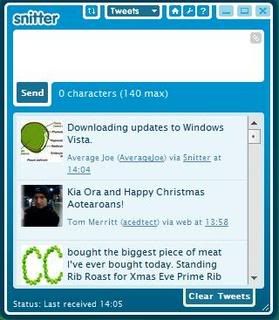
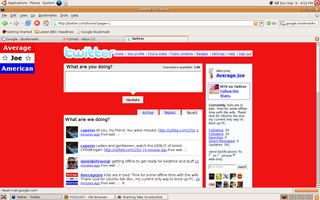
Well, there are many social networking sites, as I've said, but it seems that the most popular one of all is Twitter. And there are many, many ways to post your "tweets" to Twitter. Of course, you can simply post them directly from the site at Twitter.com. Or you can use one of the many third party applications, one of the most popular of which is Snitter. Snitter allows you to have a separate window on your desktop to update and stay updated without actually having a browser window open.
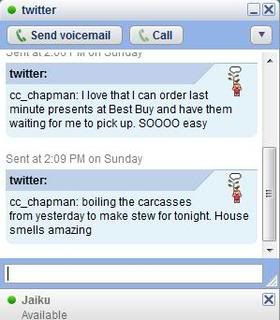
One nice and simple feature of Twitter is that you can use Google Talk to post tweets and follow other posts. With the very simple Google Talk interface, this means that you hardly have to use any additional system resources to have a Twitter window open, since you probably already have Google Talk open all the time, anyway. No separate program to open, nothing new to learn or install.
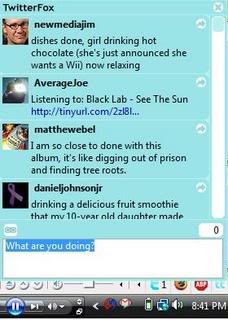
And if you're any kind of a techy -- which you probably are if you're reading this site and a frequent user of Twitter -- then you probably use Mozilla Firefox as your internet browser of choice, and can easily use the TwitterFox addon and FoxyTunes to keep up on Twitter. This, when I'm just following Twitter independently of other social networking sites, is probably my method of choice.

There's also the Firefox addon, Twitterbar, which allows you to post a link of any site you're browsing to Twitter by simply clicking a small icon in the address bar of your browser.

And if you've spent any time browsing in this internet, digital age, then you are probably completely familiar with the concept of mashups, which is simply a term which means putting two or more different Internet services or technologies together to create a more useful, or easier to use service.
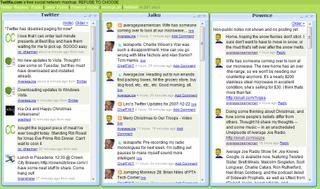
One such service is Twitku. Twitku is a mashup that combines Twitter, Jaiku, and now Pownce, into one simple site. Currently you can post simultaneously to both Twitter and Jaiku, but can only view your Pownce feeds. Surely expanded use of the Pownce service on Twitku is just around the corner.

Now, all of the above assumes that you're a Microsoft Windows user. I haven't (and won't) mention any third party programs or browser addons designed for use on Apple OS-X. I'm not an Apple fan, and admittedly know nothing about the hardware or the operating system.
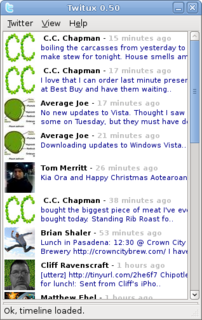
But I am a newly converted user of Ubuntu Linux. And there are a couple of third party applications available for use in Linux, such as Twitux. Like most applications for Linux, Twitux is much more basic than it's Windows based counterparts, but nonetheless provides a convenient way to stay up to date on your Twitter feed without having to have a browser window open all the time. It's easy to post to and easy to follow.
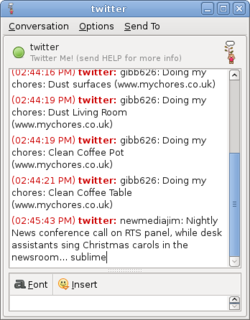
As is the Linux version of Google Talk, Pidgin, which allows you to sign in to your Google Talk account using Jabber and follow and post Twitter updates from the chat client. The only thing missing from the Pidgin interface is the Twitter avatars that people tend to be so creative with.

But I've been spending all of this time talking about Twitter, and have yet to get to the meat of what this post is all about. Why I have switched to posting my Tweets via Pownce.
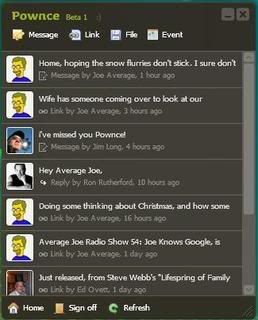
Pownce is a social networking site very similar to Twitter. It is, in many ways, much more powerful than Twitter, while in other ways it could stand to learn a thing or two from the Twitter team.

While you cannot yet (as far as I have been able to figure out, anyway) post to Pownce via SMS, as you can so easily do with Twitter, you can submit much longer posts to Pownce than the 140 character limit of Twitter. You can easily post links and pictures and even events to share with your contacts.

One thing that makes Pownce the perfect tool for me is TwitterFeed. By simply signing in with an OpenID account, you can set up any RSS feed to automatically be pushed to your Twitter account at a predetermined interval. Using this service, I post to my Twitter account my blog entries as well as my Pownce entries. Which means I can write longer posts to Pownce, including links, events, and pictures, and my Pownce entries are automatically pushed to Twitter by TwitterFeed.com. This means that when I'm sitting at my computer, I usually post to Twitter via Pownce.

It's a lot to digest, I know, and it seems there are new social networking sites/tools available every day. It's nearly impossible to stay caught up. But for me, for now, I'll be using Pownce to make most of my social networking posts (because Jaiku pulls my Twitter feed in automatically, meaning that a Pownce post eventually hits all three of the most popular short message networking sites), and I'll be staying up to date with my contacts on Twitter using TwitterFox or Snitter mostly, but occasionally by following directly at Twitter.com. I just wish Pownce would enable SMS posting.

Joe

Sunday, December 16, 2007

Connection Timed Out Error

Connection Timed OutI've been having a little trouble with my Domain Registrar lately. I have domain forwarding/masking set up so that when you type or click on a link to go to http://www.averagejoeamerican.us, you're taken to the actual Blogger hosted location of my site, http://averagejoeblogs.blogspot.com, and the address bar on your browser still displays http://www.averagejoeamerican.us. It's a pretty basic and simple service involving the use of an empty frame in which the actual page is loaded.

Anyway, over the past couple of days, there have been problems loading this forwarding page, and you get something like the error pictured above. This infuriates me on one point (you can't access the page via the domain I paid for and registered), and makes me glad at the same time that the page isn't actually hosted by the registrar (you can still access the page at it's Blogger location).

So for those of you reading this in an RSS reader, or via email, please, for the time being, point your browsers to http://averagejoeblogs.blogspot.com. I will update you when things are working properly again.


Joe

Wednesday, December 5, 2007

A Slightly New Look

Just made some changes to the site. I'm shooting for a cleaner look with the widgets a little better organized. Let me know what you think about it.

Joe

Friday, November 16, 2007

Fred Thompson: Don’t Hand Over the Internet to the U.N.

Republican Presidential Candidate Fred Thompson on the Prospect of U.N. Management of the Internet:

From The Fred File:

Don’t Hand Over the Internet to the U.N.

Posted on November 16th, 2007
By Fred Thompson

I’m no tech head, but I think I know a thing or three about the Internet and how it works. And as far as I can tell, it works pretty well.

More than 1.4 billion people around the world seem to be emailing each other a lot, and those emails get delivered a lot faster and more reliably than “snail mail.” Lots of people are innovating around the Internet – voice calling over the Internet, e-commerce, blogs, education, employment, and healthcare services, music and video streaming and downloads, and such – and lots and lots of people are profiting from those innovations and the websites and companies that operate online.

So if things are going so well, why is it that some folks are seriously thinking about taking management of the Internet away from the United States and handing control to the United Nations?

Foreign government officials from around the world meeting at a U.N.-sponsored conference in Brazil actually discussed this notion last week. It didn’t get much attention, but as we all know, that’s how bad ideas get traction.

Despite what Al Gore may think, the Internet was an invention of the U.S. government and a number of universities and other entities a couple decades ago. As the Internet became what it is today, the government created a nonprofit organization, the Internet Corporation for Assigned Names and Numbers, to manage what was then a growing network of networks. Today ICANN does things like manage the assignment of Web sites domain names – the .coms, .orgs, .edus – for example.

But countries like China aren’t happy about U.S. control of “the tubes.” They’d rather have the U.N. run it. I wonder how the U.N. would’ve handled the situation in Burma recently when the government cut off all Internet access to all anti-government protesters, or how it would’ve handled the imprisonment in China of dissidents and reporters who emailed news out of the country.

My hunch is that we’d see the same level of management of the Internet from the U.N. that we’ve seen when it came to peacekeeping operations in Africa. Or its management of Saddam Hussein’s “Oil for Food” program. Or its monitoring of Iran’s nuclear program. In fact, I wouldn’t be surprised if when you look up “fool’s errand” in the dictionary, you find: “Role for United Nations’” as the definition.

The notion of surrendering management of the Internet – a global, strategic infrastructure for communications and commerce – to the UN is just a plain dumb idea. We shouldn’t be handing over something that works right to an institution that has difficulty doing anything right.

I, for one, am in complete agreement with Fred. Though I believe that handing control of the Internet over to the United Nations is even more dangerous than he seems to think. The Internet is clearly the most powerful communication tool the world has today. To turn this powerful tool over to an organization of nations that cannot seem to come to agreement easily, cannot seem to abide by their agreements when they do come to terms, and cannot seem to enforce other nations who refuse to abide by such agreements, is the first ingredient in a recipe for disaster.

Second, I personally am not too certain that the United Nations doesn't have an evil agenda. I'm not even sure that it's apparent yet, but I strongly believe that the United Nations will be instrumental to ushering in the type of world government that we will certainly see at some point in the future; the kind of world government that will come about because it has been literally foretold; the type of world government that will only be opposed by a very small number of nations that, unfortunately, will be unable to prevent such a sinister government from rising to power.

No, I'm not a conspiracy theorist. I'm a realist. I believe that the consolidation of the nations of Europe into the European Union, and the adoption of the Euro as a unified currency, is nothing but a small preview of what the world has to look forward to. I applaud the United Kingdom for their resistance to comply with the rest of the European community. Taking what might seem like such a small step as giving control of the Internet to the United Nations would put us just one step closer to the type of Despotic rule that can only lead to a greater evil.

Kudos, Fred Thompson, for having the vision to see this and the courage to speak it aloud!

Joe

Average Joe's Review Store